Penlog is on iPhone: what it does, what it doesn't, and why now

Penlog is on iPhone. Version 1.3.0 went live in the App Store today, and I want to explain what the iPhone app does, what it doesn’t do, and why I built it when I did. The short answer to the last part is the iPhone Duo.
What it does
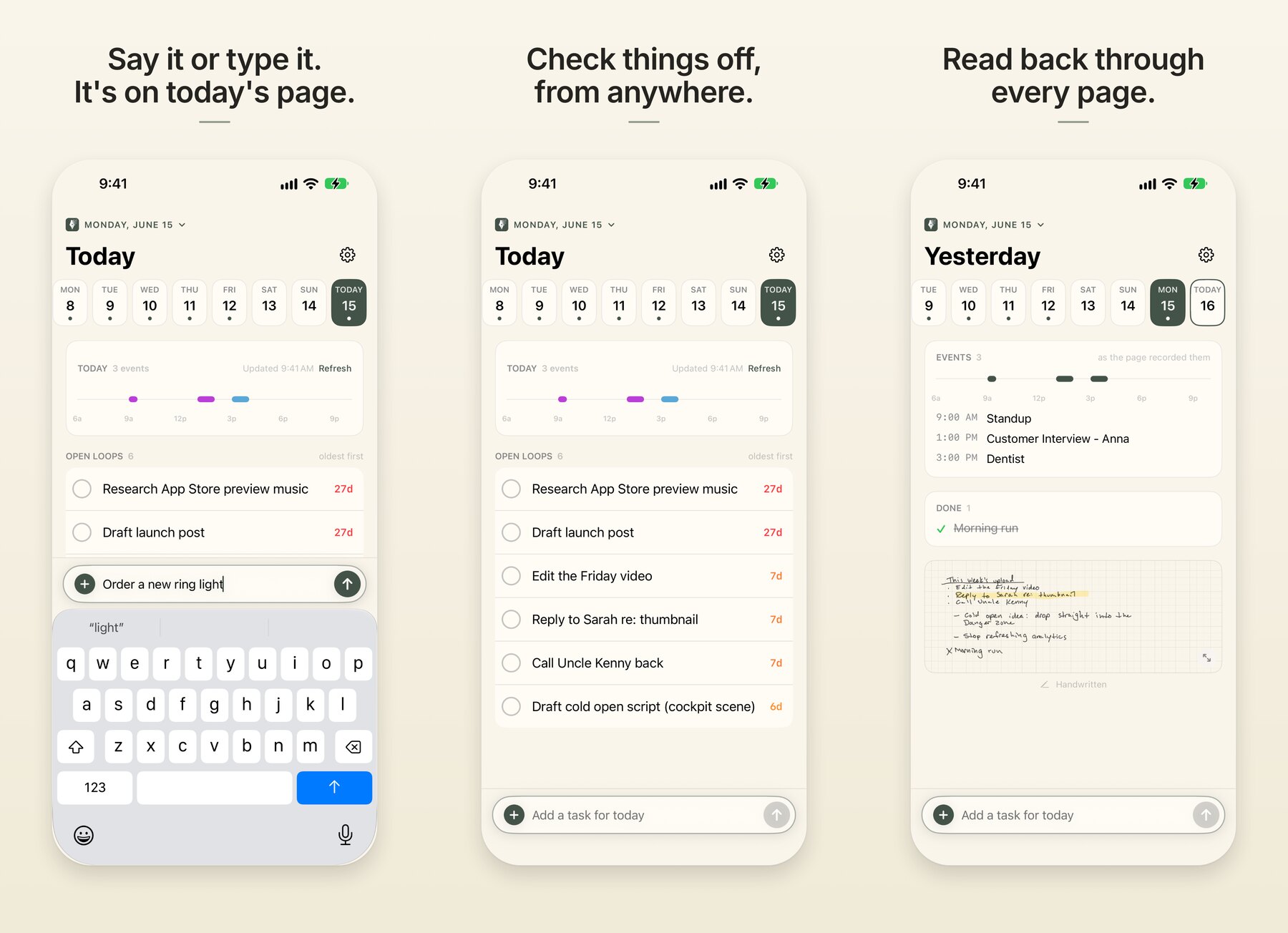
On iPhone you see today at a glance, with your calendar and every open task in one list. You can add a task by typing it or by saying “Hey Siri, Penlog a task,” check tasks off from anywhere, and read back any page you’ve written, with a calendar to jump to any day. With no signal, a task you capture is saved on your phone and sent with your next one. Everything lives in your account, so you sign in with Apple the first time you open it.
What it doesn’t do
It doesn’t write. Handwriting is the point of Penlog, and handwriting needs Apple Pencil on an iPad, so that stays on iPad. I’d rather the iPhone do a few things well than be a shrunken copy of the iPad.
The Duo pushed me over the edge
Apple ships the iPhone Duo on October 23. It is a phone that unfolds into a much larger screen, and Apple says it will work with Apple Pencil. I’m really excited about the idea of carrying my handwritten day in my pocket. Don’t get me wrong - I love my iPad, but the iPad lives on my desk instead of my pocket. I’m really excited to see how the Duo changes how I work, and specifically whether I can get the benefits of handwriting in situations where I don’t normally have my iPad handy.
The practical side is simple. As far as the App Store is concerned, the Duo is an iPhone. On Apple’s Duo simulator, an iPad-only app refuses to install, with a message that the app is built for iPad and the device is an iPhone. Until this release Penlog was iPad-only, so on October 23 it would have been missing from the Duo entirely. That is what pushed me over the edge.
Here is what to expect on a Duo, as plainly as I can say it. The Duo won’t support Apple Pencil when it launches. Apple says support is coming “later this year” and hasn’t named a date or an iOS version, and its own page lists only the Apple Pencil (USB-C). So on a Duo, Penlog starts out as the iPhone app described above, with no writing. Writing on a Duo will come in a later release, once Apple releases Pencil support. I’m keeping what we know, with sources, in a thread on the community board so I can update it as Apple says more.
Why Siri
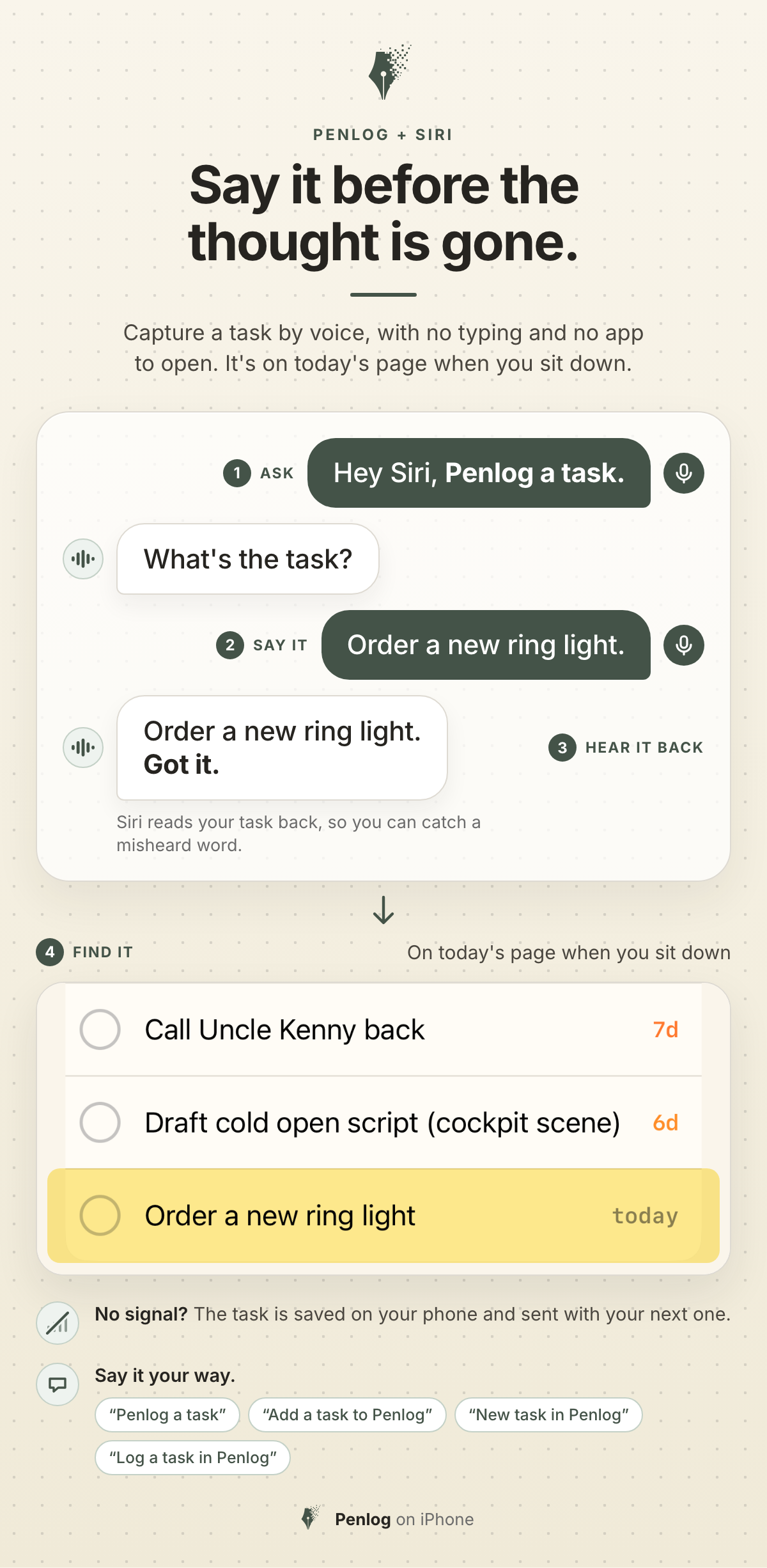
There is a second reason. I have ADD, and when a task or an idea shows up while I’m away from my iPad, I have a minute or two to catch it before something else replaces it. The “Hey Siri, Penlog a task” shortcut was already in the iPad app, but it only worked when Siri was talking to an iPad with Penlog installed, which isn’t how I use Siri. On iPhone it works where I actually am, including in the car, and the task is waiting for me in the Briefing when I sit down to write. I wrote the longer version of that story in the ADD thread on the community board.
And on iPad
Version 1.3.0 also changes the iPad. Start of day is a short pause the first time you open Penlog each day: you look over yesterday’s open tasks, check off what you finished, and start fresh, and you can turn it off in Settings. The top bar and the Briefing now sit on paper instead of gray, long pages are read in full, and days you didn’t write no longer add empty rows to Notion.
Tell me what you think
I opened three conversations on the community board, and I read every post and reply myself:
- Penlog on iPhone: what works, and what’s missing
- iPhone Duo and Apple Pencil: what we know, and what you’d want
- ADD, attention, and handwriting: the workflows that help you
Penlog 1.3.0 is in the App Store now. Thank you for using it.